Kit étui Ultra FunCam GO

$129.95

Expédition Calculé à la caisse.

Récompense de lancement : obtenez votre kit gratuitement
Commandez avant le 10 juillet 2026 à 23 h 59 TPD pour récupérer l’intégralité de la valeur du kit

Règles de récompense pour le lancement du kit de boîtier Go Ultra FunCam

  1. Cette récompense de lancement est offerte aux clients qui achètent le kit de boîtier Go Ultra FunCam sur le site officiel de PGYTECH pendant le premier mois de son lancement.
  2. Chaque commande éligible participera automatiquement au tirage au sort. Aucune inscription supplémentaire n'est requise.
  3. Après la fin de la campagne, au moins une commande éligible sera sélectionnée au hasard. Le client sélectionné recevra une carte-cadeau ou un crédit de magasin PGYTECH d'une valeur égale au montant payé pour le kit de boîtier Go Ultra FunCam, à l'exclusion des frais d'expédition, des taxes et de tout montant remboursé.
  4. La récompense sera émise dans les 15 jours suivant l'annonce du gagnant, une fois que la livraison de la commande sélectionnée aura été confirmée.
  5. La récompense peut être utilisée pour un futur achat sur le site officiel de PGYTECH. Elle ne peut être échangée contre de l'argent, transférée ou appliquée à la commande originale.
  6. Les commandes annulées, remboursées, retournées, frauduleuses ou anormales ne sont pas éligibles. Si la commande sélectionnée est remboursée ou retournée après l'émission de la récompense, PGYTECH se réserve le droit d'annuler la récompense, d'annuler tout solde inutilisé ou de demander le remboursement de la valeur de la récompense.
  7. Le client sélectionné sera contacté via l'adresse e-mail utilisée pour la commande. Les informations du gagnant pourront être annoncées sur cette page produit ou sur des pages de campagne connexes dans un format protégé par la vie privée, tel que le prénom, le pays/la région ou un numéro de commande partiel.
  8. Les clients peuvent être invités à partager leurs commentaires honnêtes sur le produit après l'avoir reçu. La soumission d'un avis est volontaire et n'affecte pas l'éligibilité à la récompense.
  9. PGYTECH se réserve le droit de modifier, de suspendre ou d'annuler cette campagne si nécessaire.
LinkGo Phone Photography Strap(Braided) Stellar Black

Sangle de photographie pour téléphone LinkGo (tressé)

Style élégant-noir stellaire / Version à montage unique

$0.00 Save $18.99
Type
Quantité
Description
  • Conception modulaire : l'étui FunCam fonctionne seul ou s'enclenche sur l'imprimante photo pour des tirages instantanés ;
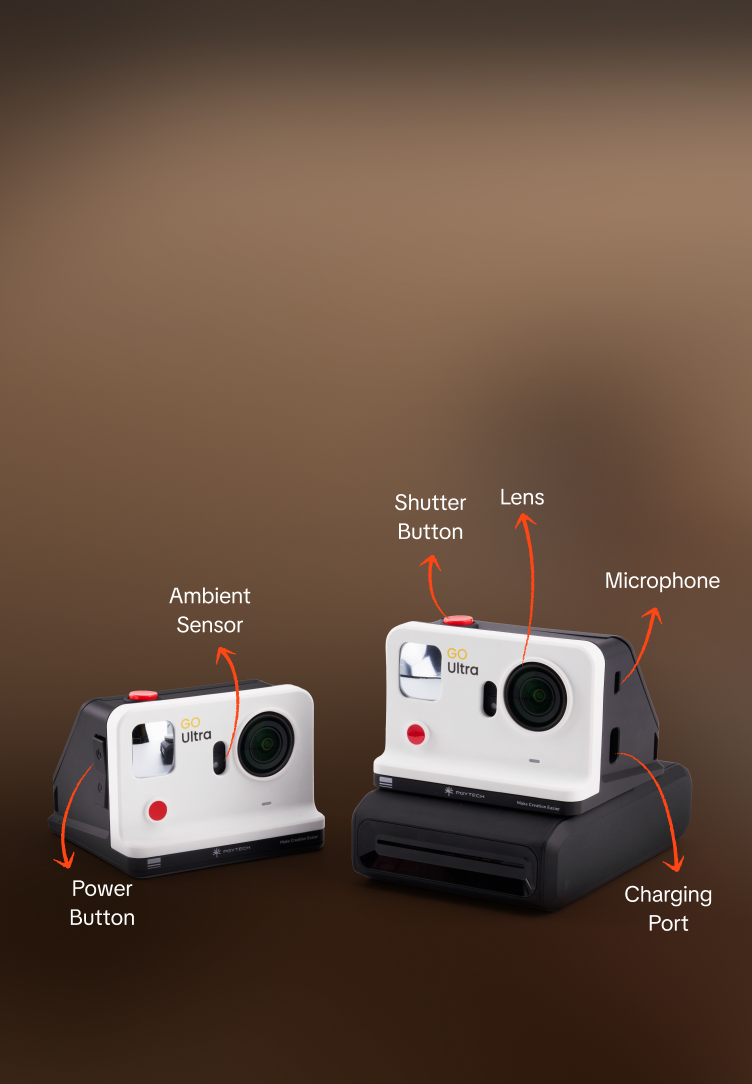
  • Miroir convexe monté à l'avant pour un cadrage parfait des selfies – fini les prises de vue à l'aveugle ;
  • L'indicateur d'état en temps réel affiche la progression de l'impression ; le chargement USB-C vous permet de rester alimenté lors de vos déplacements ;
  • Gamme de couleurs 16,7M et impression par sublimation thermique 300 dpi avec lamination automatique – photos vives et résistantes à la décoloration ;
  • Découpes précises préservant entièrement les fonctions de l'appareil photo (objectif, micro, capteurs) ;
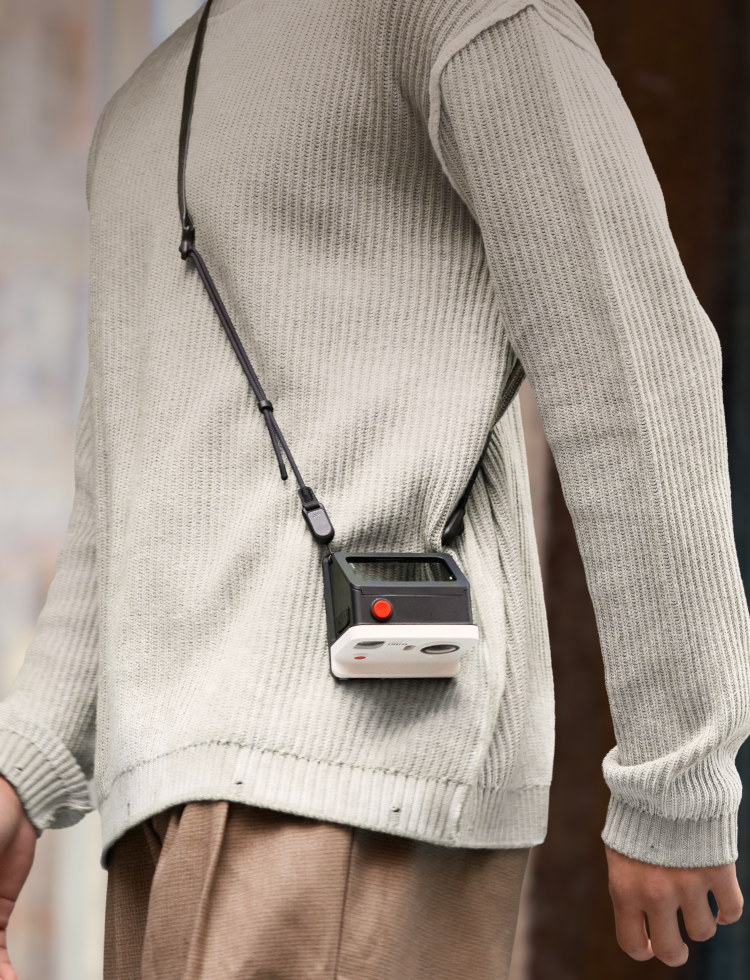
  • Deux points de fixation pour dragonne/bandoulière, plus un revêtement doux au toucher pour une prise en main confortable.
Spécifications
Compatibility
Insta360 GO Ultra

Kit étui Ultra FunCam GO

$129.95

Conception modulaire,
Impressions instantanées

La Go Ultra FunCam Case peut être utilisée seule ou
avec son imprimante photo
pour passer de façon fluide de
la documentation quotidienne au divertissement créatif.
La doublure intérieure lisse et flexible assure un montage et un démontage sans rayures.
Le mécanisme de fixation magnétique rapide se met en place instantanément, ce qui permet une installation rapide et efficace.
Le déclencheur rapide inférieur se connecte directement à l'imprimante photo. Prenez une photo et imprimez-la instantanément, et profitez de vos créations.

Adieu les photos
ratées,
bonjour les selfies parfaits

Le miroir frontal vous offre une vue claire de votre cadrage de selfie, rendant la composition facile et vous aidant à réussir vos photos à chaque fois.

Impression visible
Progression,
Tranquillité d'esprit totale

Le témoin d'état en temps réel vous permet de surveiller la progression de l'impression d'un seul coup d'œil. Le mécanisme de haute précision de l'imprimante garantit une alimentation en papier fluide et sans bourrage, pour des résultats fiables à chaque impression.
Aperçu avant impression – plus de tirages gâchés, plus de papier photo gaspillé.
Le chargement USB-C vous permet de rester alimenté et prêt pour votre prochaine aventure.

Souvenirs colorés
Pop sur papier,
Vifs et durables

Avec une gamme de 16,7 millions de couleurs pour une reproduction fidèle à la réalité ; une impression haute définition de 300 dpi, chaque instant précieux est magnifiquement préservé.
Le procédé de lamination automatique protège les images
de la poussière et de la décoloration — vos photos restent d'une clarté
et d'une couleur éclatantes pendant des générations !

Détails conçus
spécialement pour vous

Finition avec un revêtement doux au toucher pour une sensation lisse et confortable.

Dans la boîte

Étui Ultra FunCam PGYTECH GO

P-GM-446
PGYTECH GO Ultra FunCam Case Kit

P-GM-447
Papier photo PGYTECH GO Ultra FunCam

P-GM-448

Spécifications

Dimensions de l'étui GO Ultra FunCam 84*83*63mm / 3.31 × 3.27 × 2.48 po
Dimensions de l'imprimante 4,92 × 3,31 × 1,44 po (griffe porte-accessoires incluse)
Poids du boîtier GO Ultra FunCam 120 g / 0,26 lb
Poids de l'imprimante 318 g / 0,70 lb
Mode d'impression Sublimation thermique
Format du papier photo 54*82mm / 2,13 × 3,23 po
Produit compatible Insta360 GO Ultra

GO Ultra FunCam Case Kit FAQ

What are the specific dimensions and weight of the product?

GO Ultra FunCam Case Weight:120g /4.23oz

GO Ultra FunCam Case Dimensions:84*83*63mm / 3.31 × 3.27 × 2.48 in

Printer Weight:318g/11.2oz

Printer Dimensions:125 × 84 × 36.7mm/4.92 × 3.31 × 1.44in (including cold shoe)

What material is the product made of?

It is made of PA+GF composite material, which offers high strength, excellent dimensional stability, strong impact resistance, and lasting durability.

What scenarios is it suitable for?

It is suitable for a variety of scenarios, including daily recording, travel photography, street photography, vlog creation, and sharing at gatherings or parties.

What connection methods does the device support? Is it compatible with Android or iOS systems?

The device uses Bluetooth for connectivity and is compatible with Android and Apple operating systems (iOS).

Do I need to download an app? How do I pair the printer to the Insta360 camera or mobile phone? What are the specific steps for printing?

The printer can be paired via Bluetooth either directly to the Insta360 GO Ultra camera or through the Insta360 App.


Direct Print from Insta360 GO Ultra:

1.Load a pack of photo paper, then press and hold the printer's power button to turn it on.

2.On the Insta360 GO Ultra screen, swipe down from the top to open the Quick Menu → tap Bluetooth → select “Pocket Printer”.

3.Go to the camera's “Album” and choose the photo you want to print.

4.Tap “More” (upper right corner), select “Print," confirm, and wait for the printing to finish.


Print using the Insta360 App:

1.Turn on Wi‑Fi and Bluetooth on your phone.

2.Open the Insta360 App → tap“My”(lower right corner) → Pocket Printer → Connect.

3.Go to “Pocket Printer” → Print Photos.

4.Select the photo source (camera files / downloaded files / phone album), edit if desired, then tap “Start Printing”.


App Download & Installation:

iOS: Search for “Insta360” in the App Store and download.

Android: Go to the Insta360 official website download center to get the installation package; or scan the QR code on the camera startup screen or the accessory box QR code to download.

How many devices can be connected to the printer at the same time? Does it support simultaneous printing by multiple users?

The printer only supports connecting to one device (either a camera or a phone) at a time. Simultaneous printing by multiple users is not supported.

How long does it take to print one photo? How many photos can be printed continuously on a full charge?

The printing time for one photo is about 1 minute. On a full charge, it can print approximately 20–25 photos continuously.

How do I turn the printer on/off, change the paper, clear a paper jam, or restart/reset to factory settings?

Power On/Off & Bluetooth Reset:

Power On/Off: Press and hold the power button for about 5 seconds.

Reset Bluetooth: Press and hold the power button for about 3 seconds.

Clearing a Paper Jam:

1.If a paper jam occurs during printing, stop printing immediately and turn off the printer.

2.Open the paper compartment door, locate the paper jam, and carefully remove the stuck paper. Do not pull forcefully, as this may damage internal components.

3. Check whether the paper is creased or deformed. If it is, replace it with a new sheet.

4. Reload the paper, close the compartment door, restart the printer, and resume printing.

Replacing and Loading Paper:

1. Open the paper compartment door.

2. Take a new pack of photo paper and slide it into the compartment.

3. Press the area marked “PUSH”until you hear a click, indicating it is locked in place.

4. Close the paper compartment door. Paper replacement is now complete.

What is the photo print size? What types of photos can be printed?

The paper size is 82×53mm/3.22×2.08in. The printer supports printing camera photo files, Insta360 App photos, and images stored on your phone.

Does the printer require special paper? Where can I buy it?

Yes, the printer requires PGYTECH GO Ultra FunCam Photo Paper. It can be purchased at authorized Insta360 or PGYTECH stores.

What is the shelf life of the photo paper? What are the storage conditions and methods for unopened and opened paper?

The shelf life of unopened photo paper is approximately 2 years. Once opened and placed inside the printer, it is recommended to use it within 6 months. Store the paper in a cool, dark, and flat location. Do not place heavy objects on top of it.

Does the printer use ink cartridges or a ribbon? How many photos can be printed from a single photo paper pack, and how do I replace it?

The printer uses the PGYTECH GO Ultra FunCam Photo Paper 10-sheet pack, which has a built-in ribbon, so both are replaced together. To replace them, turn off the power, open the compartment cover, remove the old ribbon and paper pack, install the new pack, and close the compartment cover securely. Replacement packs are available for purchase from authorized Insta360 store.

Does the printer come with a charging cable?

 Yes. It comes with a USB‑C to USB‑A charging cable.

What is the maximum print resolution supported by the printer? Is the output quality clear and are colors accurate?

The printer features 300 DPI print resolution and a wide color gamut of 16.7 million colors, delivering clear images with natural skin tones and accurate color reproduction. It also has an automatic lamination process for effective dust and fade resistance, ensuring your photos stay vibrant and long-lasting. 

How long can the printed photos be preserved? Will they fade or get fingerprints? Are they waterproof?

With proper storage, printed photos can last over 50 years. For optimal results, please store them in a dark, dry environment away from direct sunlight. The printer automatically applies a transparent protective film which is resistant to dust, fading, and fingerprints. However, the prints are not waterproof and should be protected from exposure to water.

Is it possible to encounter issues such as paper not coming out, paper jams, incomplete paper ejection, blank prints, ghosting, or banding?

Although these issues may occur on rare occasions, their probability can be significantly reduced by ensuring the compartment door is securely closed, the photo paper is loaded correctly, the printer and paper are kept at normal room temperature, and fresh photo paper is used.

What problems will occur if the photo paper is loaded backwards or incorrectly? How do I load the photo paper correctly?

If the photo paper is loaded backwards or incorrectly, the printer’s orange indicator light will stay lit. To fix this, open the side paper compartment door, remove the photo paper pack, and make sure the side printed with the “Push Here” label is facing upward. Push it along the guide track into the compartment until you hear a crisp “click” - this indicates it is locked in place - then close the compartment door.

Does the printer support batch printing, scheduled printing, or remote printing?

The printer supports batch printing, with a maximum of 5 prints at a time. Scheduled printing and remote printing are not supported.

Is the FunCam Case waterproof?

No. The case is not waterproof. Please avoid using it in the rain and do not use underwater.

What is the warranty period?

1 year from date of purchase.

When printing directly from the Insta360 GO Ultra camera, there is a slight loading delay. Is this normal?

This is normal data transmission latency. Because the GO Ultra is a modular (split-body) device, the printer takes about 20 seconds to respond to data transmission. Please wait patiently.

Why are there two rails on the bottom of the FunCam Case, while the printer can only latch onto one side?

The printer reuses the single-rail design of the Acepro 2. During normal use, it will not become loose or fall off. Please feel free to use it with confidence.

Can partially used photo paper be removed and used in another printer?

No. The printer scans the QR code on the photo paper. Once the number of prints made from that paper reaches 10, the printer will stop printing.

There are many blue dots in the printed photos. What is the cause, and can it be improved?

This issue is related to HPRT's manufacturing process. It has been resolved in new batches produced after March.

What causes the edges of the printed photo to split/fray?

It may be caused by the paper being blocked during ejection, resulting in edge splitting. You can send the device back for inspection.

What causes red lines on the printed photos?

Dust inside the printer causes the print head to malfunction. Use a cotton swab dipped in alcohol to clean the print head.

Can the watermark logo be modified?

Users can choose whether to include the logo or not, according to their needs.

Does the printer support printing video content? For example, can I select a specific frame and print it?

No, this is not currently supported. As a workaround, you can capture a screenshot of the desired video frame using the Insta360 App player, save it to your phone, and then print it from your phone’s photo album.

When printing the same image on different printers, is there any color difference?

Slight color differences between printers are normal. Each printer has its own color calibration and hardware characteristics, which may cause minor variations.

Why are photos taken with the GO Ultra camera (50 megapixels) noticeably blurrier when printed than those taken with a phone (12 megapixels) of the same subject?

Print quality depends on the sharpness of the original image. If the original photo taken with the GO Ultra camera is blurry (e.g., due to inaccurate focus, camera shake, insufficient lighting, etc.), it will directly affect the print clarity.